User Story Haiku

Posted by Chris Sterling on 17 Dec 2008 | Tagged as: Agile, Product Owner, Scrum, User Stories, XP

In a Certified ScrumMaster course this week one of the teams created some haiku on the topic of user stories. Here is what they came up with:

INVEST your time in telling stories that give you meaning moving on…

Unique perspective inward and outward focused simply understood

The user wishes to do something on the site they do not know why

Start with a user a new or improved feature gives us the value

As a Scrum novice I want to learn this method so that we can plan

The confirmation makes conversation simple and settles details

Not bad for 5 minutes worth of work. Some of the items that were referenced:

Top 25 Open Source Projects — Recommended for Enterprise Use

Posted by Chris Sterling on 17 Dec 2008 | Tagged as: Architecture, Distributed Computing, General, Java, Maven, Open Source, Ruby, Software Architecture

This is a bit off my usual topics on this blog but I am a heavy open source user and this article is something that I hope gets to more enterprise operations, managers and executives. I have been using and deploying production available applications using open source tools, libraries, and platforms for over 12 years now. Open source tools can do almost anything commercial products are able to do and have transformed the software industry in that time span. The list given in the article contains open source projects that I would recommend and have used in the past either directly or indirectly including *nix tools and libraries shown.

I would like to add to this listing with some of the tools I have come to use often:

  • Maven 2.x+ (http://maven.apache.org/)
  • JBoss (http://www.jboss.org/)
  • Rio/Jini/Apache River (http://incubator.apache.org/river/RIVER/index.html)
  • Apache Commons (http://commons.apache.org/)
  • Subversion (http://subversion.tigris.org/)
  • Apache Web Server (http://httpd.apache.org/)
  • Bouncy Castle (http://www.bouncycastle.org/)
  • Time and Money (http://timeandmoney.sourceforge.net/)
  • Spring Framework (http://www.springframework.org/)
  • Hadoop (http://hadoop.apache.org/)
  • Ruby on Rails (http://www.rubyonrails.org/)

This is some of the open source that I have and still use on my projects. What are your favorites that were not on the list?

Executable Design — A New Name for TDD?

Posted by Chris Sterling on 13 Dec 2008 | Tagged as: Acceptance Testing, Agile, Architecture, General, Java, Scrum, Software Architecture, TDD, XP

For multiple years now I have thrown around the name “Executable Design” to describe Test-Driven Development (TDD) and how it is used for design rather than a test-centric tool. The name itself causes problems for those who are initially introduced to the technique. As a coach I was looking for a way to introduce it without stereotyping it as extra tests inhibiting more code getting delivered.

From my readings of multiple books, articles, and blog postings along with my own experiences with TDD the content of what I am about to distill is not new. This post is entirely about explaining the technique in a way that garners interest quickly. There are multiple pieces to “Executable Design” beyond the basic process of:

  • Red, Green, Refactor or
  • Write Test, Write Code, Refactor

These statements and the technique is the basis for practicing Executable Design but are not sufficient for describing the value and nuance of the practice. Not that I will be able to present it sufficiently in a single blog post but I want to present the basic principles.

While in a meeting with a team recently we were presented with a question I have heard often:

“Why should we use TDD?”

There are many reasons but generic reasoning alone is not sufficient. We discussed the safety net that good code coverage creates. We discussed the reason system tests do not take the place of unit tests. Then we started to touch on design and this is where it got interesting (and usually it does about this time for me). Before I can describe the rest of this discussion I want to present what lead up to this meeting.

A coach that I highly respect seemed a bit preoccupied one day when he wandered into my team’s area. I asked him what was going on and he told me that some of his issues with the current team he was coaching. He wondered why they were not consistently using TDD in their day-to-day development. The team had allowed a card saying “We do TDD” onto their Working Agreement and were not adhering to it.

I happened to know a bit about the background of this project that our company has been working on for over 2 1/2 years. There is a significant legacy codebase developed over many more years with poor design, multiple open source libraries included, and heavy logic built into relational database stored procedures. Also, just recently management on the client’s side had changed significantly and caused quite a shake up in terms of their participation and guidance of release deliverables. Yet the team was supposed to deliver on a date with certain features that were not well defined. This lead me to discuss the following situations that a coach can find their way into:

  1. You could come into a team that has limited pressure on features and schedule and has considered the impact of learning a new technique such as Executable Design. Also, they have asked for a coach to help them implement Executable Design effectively. This is a highly successful situation for a coach to enter.
  2. You could come into a team that has deadline pressures but has some leeway on features or vise versa and has considered the impact of learning a new technique such as Executable Design within their current release. Also, they have asked for a coach to help them implement Executable Design effectively. This is somewhat successful but pressures of the release rise and fall in this situation and may impact the effectiveness of the coaching.
  3. You could come into a team that has deadline pressures and has not considered implementing Executable Design seriously as a team. Also, they have NOT asked for a coach and yet they have gotten one. The coach and the techniques they are attempting to help the team implement may seem like a distraction to the team’s real work of delivering a release. This is usually not successful and please let me know if you are a person who is somewhat successful in this situation because we could hire you.

The current team situation seemed to be more like #3 above and therefore the lack of success in helping the team adopt TDD did not surprise me. Also, I started to play devil’s advocate and provide a list of reasons for this team NOT to do TDD:

  • At current velocity the team is just barely going to make their release date with the minimum feature set
  • Not enough people on the team know how to do TDD well enough to continue it’s use without the coach
  • The architecture of the system is poor since most logic is captured in Java Server Pages (JSP) and stored procedures
  • The code base is large and contains only about 5-10% test coverage at this time
  • It sometimes takes 10 times longer to do TDD than just add functionality desired by customer

This is not the full list but you get the picture. Don’t get me wrong, the list above begs to me the need for Executable Design but if the team does not have significant experience to implement it effectively it could seem overhead with little benefit to show for it.

After discussing this and more stuff that I won’t go into he told me about a couple of things that he can do to help the team. One of them was to work on minimizing the reasons for not doing Executable Design by discussing them with their ScrumMaster and actioning them on the impediments list. Some of those actions would go to upper management who get together each day and resolve impediments at an organizational level. One of the actions was to get our CTO and myself into a room with the team so they can ask the question “why should we do TDD?”.

Now we are in the room and most of the team members had been exposed to TDD through pairing sessions. Some of them had some ideas about where TDD was useful and why they thought it was not on this project. During the discussion one of the team members brought up a great discussion point:

“One of the problems with our use of TDD is that we are not using it for improving the design. If we just create unit tests to test the way the code is structured right now it will not do any good. In fact, it seems like we are wasting time putting in unit tests and system tests since they are not helping us implement new functionality faster.”

This team member had just said in the first sentence what I instinctually think when approaching a code base. The reason to do TDD is not just to create code coverage but to force design improvement as the code is being written. This is why I call TDD and its best known principles and practices of applying it Executable Design. If you are not improving the design of the application then you are not doing Executable Design. You might be just adding tests.

Some of the principles I have found to help me in applying Executable Design effectively are (and most, if not all, of these are not something I came up with):

  • Don’t write implementation code for your application without a failing unit test
  • Separate unit tests from system and persistence tests. (as described in this previous blog entry)
  • Create interfaces with integration points in a need-driven way (as described in this previous blog entry)
  • Always start implementing from the outside in (such as in Behavior-Driven Development and as described in this previous blog entry)
  • Mercilessly refactor the code you are working on to an acceptable design (the limits of which are described in this previous blog entry)
  • Execute your full “unit test” suite as often as possible (as described in this previous blog entry)
  • Use the “campground rules” of working in the code: “Leave the site in better shape than when you arrived”
  • Create a working agreement that the whole team is willing to adhere to, not just what the coach or a few think is the “right” agreements to have.

Try these out on your own or with your team and see how they work for you. Modify as necessary and always look for improvements. There are many thought leaders in the Agile community that have written down important principles that may work for you and your team.

And finally, now that I have filled an entire blog post with “Executable Design” what do people think about the name? It has worked for me in the past to explain the basic nature of TDD so I will use it either way unless others have better names that I can steal?

A Kaizen Mindset

Posted by Chris Sterling on 22 Nov 2008 | Tagged as: Agile, General, Leadership, Scrum

To start with, I want to be honest about my knowledge of kaizen. I have not been in a workplace where the actual term kaizen was used to demonstrate improvements within our organization. I have researched quite a bit about it and found the book “The Kaizen Revolution” by Michael Regan was the easiest for me to read on the subject. This book also follows a fictional situation that creates examples of using the kaizen philosophy to change a company around. Through my research and discussions with others on the subject I have found that kaizen and the mindset shift is similar to that enabled by the Scrum framework.

Scrum is based on an empirical process control that focuses on inspecting the current state and adapting behavior to improve. This focus on continuous improvement through “inspect and adapt” is supported in the Scrum framework at 3 points in the process.

  • The Daily Scrum meeting allows the team to focus on their commitment for the current Sprint and whether they are still on track to deliver on that commitment. If they are not able to meet the commitment then they are asked to adjust the Sprint therefore adapting to the situation.
  • The Sprint Review meeting allows customers to view a potentially shippable product increment created by the Team and provide feedback that adjusts the Product Backlog contents and priorities. We are inspecting the product and adapting to a new understanding of the product.
  • The Sprint Retrospective enables the Team to improve the process they use to delivery software each Sprint. The Team is expected to inspect their process honestly and thoroughly to figure out how they can adjust for improved delivery capability in the following Sprint.

The “inspect and adapt” focus allows for a Team and product to continually improve over time through seemingly simple mechanisms with sizable effects on the software delivered. An unexpected or additional effect of this focus on “inspect and adapt’ in Scrum is the organizational environment encompassing the team starts to adjust based on needs of the Team to improve their software delivery. Therefore a single team causes “organizational change” through small and incremental adjustments.

One of the main tools that a Scrum Team can use to “inspect and adapt” is the “impediment”. An impediment is:

“Anything that prevents a team member from performing work as efficiently as possible” - from Victor Szalvay’s article “Glossary of Scrum Terms”

In coaching teams I have found that capturing impediments is done casually and is not initially found to be as important as other activities the team is doing. Over time I have found a few simple “rules of thumb” for capturing impediments that have helped Scrum Teams:

  • ScrumMasters keeping a physical impediment and action item list. As we teach in the Certified ScrumMaster course it is important to action impediments after the Daily Scrum meeting immediately. Many of our teams at SolutionsIQ setup an area to capture impediments written on post-it notes. Following the Daily Scrum meeting team members who are interested in taking action on the newly captured impediments stay behind to work with the ScrumMaster. An action item is created identifying “What” needs to be done, “Who” is going to make sure it happens, and “When” they will communicate progress back. It usually looks something like this:
Impediments getting actioned

Impediments getting actioned

  • At least 1 impediment raised every Daily Scrum. It is my opinion that if a Scrum Team is unable to bring up at least 1 impediment at each Daily Scrum then the ScrumMaster is not supporting the team effectively. I want the ScrumMaster to find ways to extract at least 1 impediment during the Daily Scrum. In the past I have asked teams whether they were comfortable speaking about an impediment they are having in the Daily Scrum with me there. I have also pleaded with a team to tell me at least one impediment before we leave. One time the Daily Scrum was before a Sprint Review we were going to conduct in the afternoon. Each team member said they had no impediment and at the end I found out that at least one person was not ready to demo the software just by asking “Why are there no impediments today?”.
  • Ask everybody on the team to write down at least 1 impediment. Sometimes a Scrum Team has improved significantly and begin to get into a flow. Although I want to celebrate significant improvements we should not sit on our laurels. The stagnation of “status quo” can catch hold quickly and we must find ways to break through this potential behavioral issue. Just ask all members of the team to write down at least 1 impediment and then work with the team to action those impediments immediately as shown above. One of my colleagues, Brent Barton, once wrote up on our white board the following saying that I have found to be helpful to me for fighting the “status quo”:

“The absence of conflict is not harmony, it’s apathy” - from article by Kathleen M. Eisenhardt, Jean L. Kahwajy, and L.J. Bourgeois III called “How Management Teams Can Have a Good Fight”

    My own nature has helped me internalize the “inspect and adapt” mindset with Scrum. I used to think I was lazy but the fact that I would work additional hours to improve builds, mock frameworks, test cases, and other artifacts of projects I worked on seemed to contradict this. The reason I thought I was lazy was my tendancy to find ways to automate just about anything that could be so that I did not have to manually do it anymore. My initial splash into programming actually started this way while working in a data entry job. Each day my work was incredibly repetitive. One day a person who understood the software we were using to do data entry showed me the use of a cool macro that allowed fields to be automatically filled out. I was immediately impressed and asked them to show me how that worked. The language used was a Visual Basic knock off and the scripts I wrote following this allowed me to get 10 times faster in my data entry. I was able to focus on other activities including learning HTML, JavaScript, Pascal, and Java. The moral of this story is jump on opportunities to improve your environment including processes, facilities, and software.

    Those additional hours I put in has decreased over time as I have found a much more sustainable pace for myself. I cannot say that I keep a fully sustainable pace even now but at least I am able to identify earlier when I am starting to tank. The “inspect and adapt” mindset should not cause our Scrum Team to adapt themselves into a culture of late hours and intravenous Red Bull drips. A Scrum Team should find ways to adjust within their timebox rather than adjust their timebox. This means that hourly, daily, and iteration timeboxes are important to understand and monitor for breakage. As a ScrumMaster I want the team to keep a constant pace as much as possible and sudden adjustments that cause time management problems should be identified immediately and monitored from there to resolution ASAP.

    A continual need to improve my life and environment has become an addiction of mine. How can I better use the time I have with my family? How can I help make my work environment even more fun to work in? What can I do to improve my knowledge in all types of subjects? This addiction has been a valuable behavior for my entire life and I hope that others will find something that has similar effects for themselves. People reading this blog who are currently using Scrum please use the impediment to your advantage and find ways to improve your software delivery. It’ll be worth every minute used to “inspect and adapt” your Sprint, Product Backlog, and processes.

    Managing Software Debt presentation @ Agile Vancouver

    Posted by Chris Sterling on 10 Nov 2008 | Tagged as: Agile, Architecture, DotNet, General, Java, Leadership, Product Owner, Scrum, Software Architecture, TDD, XP

    On November 6th I presented an updated version of the Managing Software Debt talk at Agile Vancouver “Much Ado About Agile” conference. This is a link to the presentation deck:

    Managing Software Debt - Agile Vancouver (PDF)

    I was honored to present at this local conference and had a great time meeting up with old friends and getting to know some new ones. I hope that I can do this again soon. If you are interested in more information and other presentations at Agile Vancouver you can go to their home page.

    Managing Software Debt - article

    Posted by Chris Sterling on 20 Oct 2008 | Tagged as: Acceptance Testing, Agile, Architecture, General, Leadership, Product Owner, Scrum, Software Architecture, TDD, XP

    Managing Software Debt
    Continued Delivery of High Values as Systems Age

    Many software developers have to deal with legacy code at some point during their careers. Seemingly simple changes are turned into frustrating endeavors. Code that is hard to read and unnecessarily complex. Test scripts and requirements are lacking, and at the same time are out of sync with the existing system. The build is cryptic, minimally sufficient, and difficult to successfully configure and execute. It is almost impossible to find the proper place to make a requested change without breaking unexpected portions of the application. The people who originally worked on the application are long gone.

    How did the software get like this? It is almost certain the people who developed this application did not intend to create such a mess. The following article will explore the multitude of factors involved in the development of software with debt.

    What Contributes to Software Debt?

    Software debt accumulates when focus remains on immediate completion while neglecting changeability of the system over time. The accumulation of debt does not impact software delivery immediately, and may even create a sense of increased feature delivery. Business’ responds well to the pace of delivered functionality and the illusion of earlier returns on investment. Team members may complain about the quality of delivered functionality while debt is accumulating, but do not force the issue due to enthusiastic acceptance and false expectations they have set with the business. Debt usually shows itself when the team works on stabilizing the software functionality later in the release cycle. Integration, testing, and bug fixing is unpredictable and does not get resolved adequately before the release.

    The following sources constitute what I call software debt:

    • Technical Debt[1]: those things that you choose not to do now and will impede future development if left undone
    • Quality Debt: diminishing ability to verify functional and technical quality of entire system
    • Configuration Management Debt: integration and release management become more risky, complex, and error-prone
    • Design Debt: cost of adding average sized features is increasing to more than writing from scratch
    • Platform Experience Debt: availability and cost of people to work on system features are becoming limited

    Software Debt Creeps In
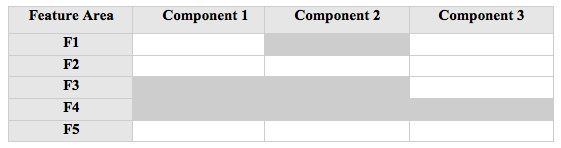
    Figure 1.1: A relatively new system with little debt accrued.

    Figure 1.1 displays a system that has minimal amount of software debt accrued. A few low priority defects have been logged against the system and the build process may involve some manual configuration. The debt is not enough to significantly prolong implementation of upcoming features.

    Business owners expect a sustained pace of feature development and the team attempts to combine both features and bugs into daily activities, which accelerates the accrual of debt. Software debt is accruing faster than it is being removed. This may become apparent with an increase in the number of issues logged against the system.
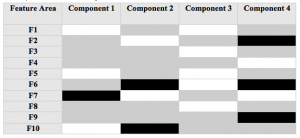
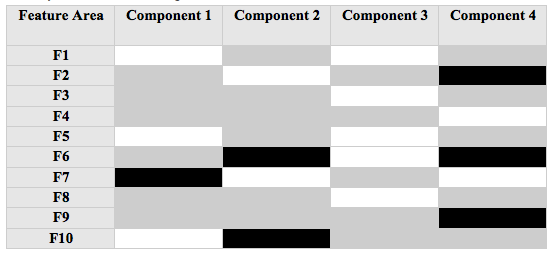
    Figure 1.2: An aging software system slowly incurs significant debt in multiple functional areas.

    As a system ages, small increments of software debt are allowed to stay so the team can sustain their velocity of feature delivery. The team may be complaining about insufficient time to fix defects. Figure 1.2 shows a system that has incurred software debt across all functional areas and components.

    At this point, delivery slows down noticeably. The team asks for more resources to maintain their delivery momentum, which will increase the costs of delivery without increasing the value delivered. Return on investment (ROI) is affected negatively, and management attempts to minimize this by not adding as many resources as the team asks for, if any.

    Even if business owners covered the costs of extra resources, it would only reduce the rate of debt accrual and not the overall software debt in the system. Feature development by the team produced artifacts, code, and tests that complicate software debt removal. The cost of fixing the software debt increases exponentially as the system ages and the code-base grows.
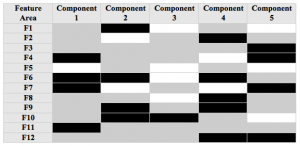
    Figure 1.3: The aging system has accrued significant debt in all functional areas and components.

    Software debt in the system continues to accrue over time, as shown in figure 1.3. At this point, new feature implementation is affected significantly. Business owners may start to reduce feature development and put the system into “maintenance” mode. These systems usually stay in use until business users complain that the system no longer meets their needs.

    Managing Software Debt

    There are no magic potions for managing software debt. Software can accrue debt through unforeseen circumstances and shortsighted planning. There are some basic principles that help minimize software debt over the lifespan of the product:

    • Maintain one list of work
    • Emphasize quality
    • Evolve tools and infrastructure continually
    • Always improve system design
    • Share knowledge across the organization
    • And most importantly, hire the right people to work on your software!

    Maintain One List of Work

    One certain way to increase software debt is to have multiple lists of work. Clear direction is difficult to maintain with separate lists of defects, desired features, and technical infrastructure enhancements. Which list should a team member choose from? If the bug tracker includes high priority bugs, it seems like an obvious choice. However, influential stakeholders want new features so they can show progress to their management and customers. Also, if organizations don’t enhance their technical infrastructure, future software delivery will be affected.

    Deployed software considered valuable to its users is a business asset, and modifications to a business asset should be driven from business needs. Bugs, features, and infrastructure desires for software should be prioritized together on one list. Focus on one prioritized list of work will minimize confusion on direction of product and context-switching of team members.

    Emphasize Quality

    An emphasis on quality is not only the prevention, detection, and fixing of defects. It also includes the ability of software to incorporate change as it ages at all levels. An example is the ability of a Web application to scale. Added traffic to the web site makes performance sluggish, and becomes a high priority feature request. Failed attempts to scale the application result in a realization that the system’s design is insufficient to meet the new request. Inability of the application to adapt to new needs may hinder future plans.

    Evolve Tools and Infrastructure Continually

    Ignoring the potential for incremental improvements in existing software assets leads to the assets becoming liabilities. Maintenance efforts in most organizations lack budget and necessary attention. The International Organization for Standardization (ISO) standardizes on four basic categories of software maintenance in ISO/IEC 14764[2]:

    • Corrective maintenance - Reactive modification of a software product performed after delivery to correct discovered problems
    • Adaptive maintenance - Modification of a software product performed after delivery to keep a software product usable in a changed or changing environment
    • Perfective maintenance - Modification of a software product after delivery to improve performance or maintainability
    • Preventive maintenance - Modification of a software product after delivery to detect and correct latent faults in the software product before they become effective faults

    Most maintenance efforts seek to prolong the life of the system rather than increase its maintainability. Maintenance efforts tend to be reactive to end user requests while business evolves and the technology decays.

    To prevent this, attention must be given to all four categories of software maintenance. Budgets for software projects frequently ignore costs for adaptive, perfective, and preventive maintenance. Understanding that corrective maintenance is only part of the full maintenance picture can help an organization manage their software assets over it’s lifespan.

    Improve System Design Always

    Manage visibility of system design issues with the entire team. Create a common etiquette regarding modification of system design attributes. Support the survival of good system design through supportive mentoring, proactive system evolution thinking, and listening to team member ideas. In the end, a whole team being thoughtful of system design issues throughout development will be more effective than an individual driving it top down.

    Share Knowledge Across the Organization

    On some software systems there is a single person in the organization who owned development for 5 years or more. Some of these developers may find opportunities to join other companies or are getting close to retirement. The amount of risk these organizations bear due to lack of sharing knowledge on these systems is substantial.

    Although that situation may be an extreme case of knowledge silos, a more prevalent occurrence in IT organizations is specialization. Many specialized roles have emerged in the software industry for skills such as usability, data management, and configuration management. The people in these roles are referred to as “shared resources” because they use their specialized skills with multiple teams.

    Agile software development teams inherit team members with specialized roles, which initially is a hindrance to the team’s self-organization around the work priorities. Teams who adhere to agile software development values and principles begin to share specialized knowledge across the team, which allows teams to be more flexible in developing software based on priorities set by business. Sharing knowledge also reduces the risk of critical work stoppage from unavailable team members who are temporarily on leave.

    Hire the Right People!

    It is important to have the team involved in the hiring process for potential team members. Teams will provide the most relevant skills they are looking for, thus, allowing them to review and edit the job description is essential. Traditional interview sessions that smother candidates with difficult questions are insufficient in determining if the candidate will be a great fit. Augmenting the interview questions with a process for working with the candidate during a 1 to 2 hour session involving multiple team members in a real-world situation adds significant value to the interview process. Before hiring a candidate, teams members should be unanimous in the decision. This will increase the rate of success for incorporation of a new team member since the team is accepting of their addition.

    Another significant hiring focus for organizations and teams is placing more emphasis on soft skills than technical expertise. I am not advocating ignoring technical experience. However, it is critical in an agile software development organization or team to have people who can collaborate and communicate effectively. Soft skills are more difficult to learn than most technical skills. Look for people who have alignment with the hiring team’s values and culture.

    In Summary

    As systems age they can become more difficult to work with. Software assets become liabilities when software debt creeps into systems through technical debt, quality debt, configuration management debt, design debt, and platform experience debt.

    Applying the six principles in this article will lead to small changes that over time will add up to significant positive change for teams and organizations. The goal of managing software debt is to optimize the value of software assets for our business and increase the satisfaction of our customers in the resulting software they use.

    References

    1. Ward Cunningham - “Technical Debt” - http://c2.com/cgi/wiki?TechnicalDebt
    2. “ISO/IEC 14764: Software Engineering — Software Life Cycle Processes — Maintenance” - International Organization for Standardization (ISO), revised 2006

    Why Should We Manage Software Debt?

    Posted by Chris Sterling on 18 Oct 2008 | Tagged as: Acceptance Testing, Agile, Architecture, Leadership, Product Owner, Scrum, Software Architecture, TDD, XP

    In the past I have blogged on software debt in terms of:

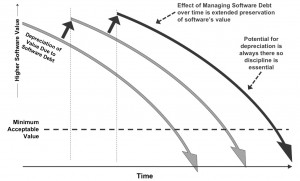
    Although there are reasons defined or implied in those blog entries I think it is important to discuss it more directly. The following image will be the backdrop for the rest of this blog entry.

    Effect of Managing Software Debt to Preserve Software Value

    Software that has been around for some time usually gets difficult to work with. The value of the software depreciates as more debt creeps into the software because the costs have not went down and probably went up to keep up with maintenance. So the costs are rising to maintain the system and the value of the software is depreciating. A business asset that has these kind of characteristics is in jeopardy of getting scrapped. Sometimes the only thing stopping us from scrapping the software is that we have nothing else to replace it and the business processes it currently supports are dependent on it.

    Depreciation of software is inevitable but when we manage software debt diligently with a disciplined approach we can significantly prolong the depreciation from going below the minimum acceptable value for the software. In fact, if we manage software debt in the process of adding business functionality we will increase the software’s value and therefore further prolonging significant depreciation.

    I will be at Agile Vancouver speaking on “Managing Software Debt” on November 6th. This presentation has been given in multiple variations over the past year and a half. Although I won’t go into detail here, the following 6 principles are what I see as essential to managing software debt effectively:

    • Maintain one list of work
    • Emphasize quality
    • Evolve tools and infrastructure continually
    • Improve system design always
    • Share knowledge across the organization
    • And most importantly, hire the right people to work on your software!

    I will post on more details of managing software debt in the near future.

    Refactoring: How Far Should I Go?

    Posted by Chris Sterling on 13 Oct 2008 | Tagged as: Acceptance Testing, Agile, Architecture, Product Owner, Scrum, Software Architecture, XP

    Refactoring is an essential practice for teams developing solid software and continually evolving the design to meet new customer needs. From the home page managed by Martin Fowler, who wrote the original book on refactoring, it says:

    “Refactoring is a disciplined technique for restructuring an existing body of code, altering its internal structure without changing its external behavior.”

    On a project that is well tended in terms of its design and structure the act of refactoring can be elegant and liberating. It will allow teams to continually inspect and adapt their understanding of the code and the customer’s need as they gather feedback on the software.

    On a legacy system the act of refactoring can seem overwhelming. Although the refactoring craft revolves around the mindset that continually making small incremental improvements will lead to overall improvement in the design figuring out where to start and stop in a legacy system is unclear. This blog entry is for teams who are unclear on where to begin refactoring and how much refactoring is sufficient day to day.

    Where to Start Refactoring?

    On all teams that I have worked with either as a team member or coach this question starts with the answer:

    When the feature you are working on exposes the need to refactor

    The problem is that this does not give a full answer with context and understanding for the particular project we are discussing. I like to answer the following questions before starting to refactor:

    • Does this change directly affect the feature I am working on?
    • Would the change add clarity for the feature implementation?
    • Will the change provide automated tests where there currently are none?
    • At first glance does the refactoring look like a large endeavor involving significant portions of the system components?

    For the first 3 questions if the answer is “yes” then I am leaning towards starting a refactoring of the code. The only caveat is the answer to the last question. If the answer to this question is “yes” then I will use my experience with the system help me generate a gut feeling about the size of this refactoring compared to our initial cost estimate of the feature implementation. If the size of the refactoring is significantly larger than the cost estimate given to the Product Owner / Customer then I may decide to bring the refactoring up to the team for discussion. As we teach in the Certified ScrumMaster course:

    The Product Backlog estimate is a mutually agreed budget. If the team is going to exceed the budget, it needs to escalate the decision. Otherwise, the team introduces scope creep.

    When to Stop Refactoring?

    Using the word “stop” is misleading since it means we just decide to quit at some point in time without regard for the situation. I would not suggest this at all. Instead the following conditions are what I use to figure out when I have finished a refactoring:

    • Am I refactoring code structures that are not directly affected by the current feature?
    • Are there any more code structures that are directly affected by the current feature I am working on that have not been refactoring sufficiently?
    • If the refactoring is blowing our mutually agreed upon budget for this feature with the Customer then I should bring this up to the team to discuss further progress
    • If we decide as a team that the refactoring can be absorbed into the current iteration without affecting delivery on our original iteration commitments then continue to refactor
    • If the refactoring cannot be absorbed into the current iteration without affecting delivery on our original iteration commitments then we must bring it up to the Customer to discuss how to proceed

    If the situation leads us to bringing up the refactoring to our Customer then the options for are to:

    • Simplify the original feature - the team could bring a suggested simplification to the customer
    • Remove the feature from the current iteration commitments
    • Remove one of the other features from the current iteration commitments

    Wrap Up

    Starting a refactoring should be identified in the course of implementing a piece of business value prioritized by the Customer. We should gauge the size of the refactoring against the cost estimate given to the Customer. Wrapping up a refactoring should not be done without regard for the quality of our implementation going forward. The result of a refactoring should be improved code structure while preserving existing functional behavior. Use the questions, conditions, and options to manage your refactorings along with delivery of business value to your Customers.

    The “Team Member in Siberia” Anti-Pattern

    Posted by Chris Sterling on 13 Oct 2008 | Tagged as: Agile, Architecture, Leadership, Product Owner, Scrum, Software Architecture, XP

    From time to time I speak with a team member, ScrumMaster, functional manager, or Product Owner that asks how do we handle maintenance tasks. After we get past the obvious question “why do you have a problem with maintenance tasks?” we discuss team configurations to handle their current maintenance pains.

    Traditional methods of managing maintenance tasks tell us to separate maintenance tasks from feature delivery because it always slows us down when we do both at the same time. I agree that it slows us down and I would look at this as an opportunity to start fixing the root cause of this issue. Usually this has something to do with our software development processes not providing us the ability to build integrity into our product as we go. Instead we are constantly reacting to what we might have broken hours, days, months, and years ago once it gets found. It costs much more to fix the problem when it has persisted so long in the system with new code surrounding and depending upon it now. Our first objective must be to start the long payback period on the system’s software debt that we have allowed to accrue.

    The next step is to figure out how we manage our day to day activities. I would like to discuss the “Team Member in Siberia” anti-pattern before I plot out potential solutions for maintenance of existing systems.

    Team Member in Siberia

    Context

    Teams find maintenance work diverts their focus from new product feature development. In order to combat these diversions the team, functional managers support the team members, and customers wish to seperate the maintenance work from new product feature development.

    Problem

    Separation of maintenance work that diverts focus of teams from new product feature development means:

    • Certain team members will be singled out for maintenance
    • If maintenance work is on a specific platform that an individual team member has the most knowledge about they may be singled out to always handle those work items
    • The team members who are developing new features for the product may be creating some of the maintenance issues that divert focus but do not have to deal with their ramifications
    • Team members who are allocated to working on maintenance work may find that meeting with other team members is a waste of time since nobody else on the team is collaborating with them to handle those work items. (a feeling of micro-management may ensue)
    • Maintenance issues usually are not as fun to work on and may be seen as a demotion to some team members

    There is not a one-size-fits-all approach to deal with the “Team Member in Siberia” anti-pattern immediately. As a Scrum Coach and Certified Scrum Trainer I suggest that the principal “if it’s not in the Product Backlog it doesn’t exist” is essential. Once we divert work into a separate list it is as if we have a separate Product Backlog. One team should not be pulling items from multiple Product Backlogs. I would also suggest that if you have one product then you have a single prioritized Product Backlog to represent it.

    Questions to Ask

    Some questions that you can ask when the teams are in the context described above and exhibiting one or more of the problems listed are:

    • Are all team members working on the same product?
    • Are we diverting a tenured team member onto work they do not enjoy?
    • Are the work items that are diverting our focus recurring problems?
    • Why do we have enough maintenance work that it causes us to think about allocating team capacity or a separate list of work to it?
    • Do we have a risk of knowledge getting tied up in one person’s head and therefore we are not respecting the “bus factor”?
    • Are defects generated by the new feature development team that get fixed by the maintenance team?
    • Are team members not finding value in attending a Daily meeting or complaining about getting micro-managed with agile?

    Potential Solutions

    Although each organization has it’s own culture, sources of influence, and characteristics there are a few potential solutions I have seen to enable more alignment of the “Team Member in Siberia” with the rest of the development team.

    • Share maintenance responsibilities across team - Instead of placing all responsibility for system maintenance on a single individual or small group of people make the maintenance activities part of the whole team’s shared responsibilities. In fact, force mentoring on maintenance activities across the team by always having a person less familiar with the system shepherd the task and ask for mentoring when necessary from the person with more familiarity.
    • Put maintenance activities into backlog of work - Rather than keep a separate list of work from the new features from business, have business prioritize the maintenance work along with the new features. This forces maintenance to get more attention over time and streamlines maintenance with better infrastructure in order to enable new feature development.
    • Track the amount of maintenance work - Teams can keep a container and small pieces of paper in their Daily Standup area so they can capture how much time was used each day on unplanned maintenance work. Although this won’t fix the problem we can become more aware of how much work is coming in unplanned. You can do a couple of things with this information. Firstly, teams add up the amount of unplanned maintenance work they have each day or iteration and track trends over time to see if they are handling it more efficiently. Second, it can be used to inform business about the amount of unplanned work impacting the team. Lastly, the team can figure out how to streamline and minimize the unplanned work over time.
    • Define product backlog items from the end user’s point of view - Some backlogs contain what could be thought of as tasks for the team to take on rather than describing what the end user wants. Instead of items such as “analyze monthly revenue report” describe a higher level need of the end user such as “As Finance I want to see the monthly revenue report”. The first item is something that a business analyst on the team will work on but the second item will involve multiple team members including the business analyst, tester, and programmer. When these team members come to their Daily Standup they will have common work items and be more interested in potential impacts on each other. This will cause the Daily Standup to feel less like micro-management.

    There are other potential solutions but this list is a good start for those finding their teams in the “Team Member in Siberia” anti-pattern. Please share your potential solutions, suggestions, and questions in the comments of this blog entry. And get those team members working together for the good our products.

    Defining the “Unit” in Unit Testing

    Posted by Chris Sterling on 27 Sep 2008 | Tagged as: Agile, Architecture, DotNet, Java, TDD, XP

    “Hey, Ben. We just figured out a great way to manage test-driven development and good database design.”, said an enthusiastic developer using Extreme Programming (XP) practices on their project. “Our application is highly data-centric. Therefore, in the first iteration we design the database schema modifications and create tests to validate all of it’s implementation characteristics. The next iteration we build the data access layer and business services on top of the database modifications. This has allowed us to design the database correctly before developing code around the wrong data model. What do you think about this approach?”

    Ben is an agile coach who checks in with this team from time to time. He likes the fact that this team has continually looked for improvements in the way they develop software. In this case Ben sees a potential issue and so he asks a question, “What do you deliver to the customer at the end of your first iteration?”.

    “We show the customer our database design and tests executing.”

    “What does the customer think about this?” Ben probes further.

    “He doesn’t seem to care about this part of our product review. He told us that we should just show him the finished feature after the next iteration.”

    “Didn’t we setup a Definition of Done for the team to assess quality of our delivery each iteration? If we don’t have customer accepted functionality at the end of the iteration didn’t we decide that the work is not done?”

    “Yeah, but we found out that the data design and automated test case development for it takes too long to fit into an iteration along with feature development on top of it.”

    “Hmmm, that sounds like we may be working around our definition of done which seems like a ’smell’ in our process. Lets sit down and see what the root cause of this new process that extends development of functionality over two iterations rather than within one iteration.”

    Relational databases have proven themselves to be great persistence platforms. As their usage increased in software development they have gone beyond their intended usage into the application server realm with stored procedures, functions, and triggers not to mention parsing and other functionality added recently in the marketplace. Applications become highly dependent on a relational database and become more difficult to change over time. The more difficult the relational database becomes to change the more we baby it and look for ways to not have to modify it for long periods of time. This leads to designing up front and the “getting it right the first time” mentality with our data models.

    When we start in the bowels of our system with design, tests, and implementation we tend to “gold plate” our implementation. Thus developing more code and tests than is actually needed for the implementation. Many times this approach violates the YAGNI (”you ain’t gonna need it”) guideline for agile software development.

    During coaching engagements I speak with team members about starting from the user’s point of view even in development of your unit tests. What is the next piece of functionality that will support their feature request? Many developers immediately comment that these are no longer “unit tests” as they have previously defined them. I ask what they characterize as a unit test and it usually is not easy for them to verbalize. If we think of a unit as part of an existing design we will tend to write tests for all potential ways the design could be used. If we always drive our next test based on what the next unit of functionality should do for the user then we will implement only what is necessary.

    Behavior-Driven Development (BDD) describes a process for developing from the outside in. The first piece of code the developer implements in this approach is the interface. From the interface a developer drives out the rest of the functionality. This ensures that all code is directly related to functionality valuable to the customer or other code already written. Although there are great frameworks out there to support BDD in your development environment you can begin by starting to think about your xUnit tests in this manner. Start from the interface and make sure each additional capability implemented to satisfy a test is adding or supporting value from the user’s point of view. Please read this wikipedia entry on BDD for actual test case and code examples.

    In addition, I will make a suggestion that whenever a technology element within your architecture is difficult to change you should definitely minimize interactions with it and abstract all access. Proper unit testing that focuses on a unit of code will force the use of proper interface abstractions in order to not make the test dependent on components external to the unit such as a database. Minimizing interactions will reduce your application’s dependence and also increase changeability of it for future business functionality to be implemented. Business changes so software should be able to change with it.

    Next »